


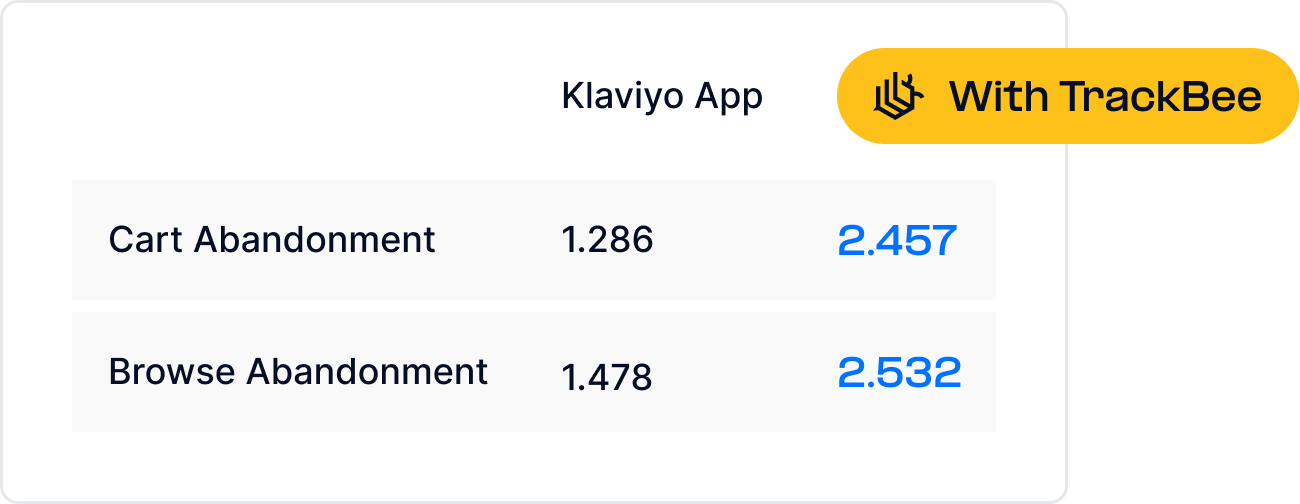


Short answer: Browse abandonment flows fail silently because the Viewed Product event does not fire or Klaviyo cannot identify the visitor, not because the copy is wrong. The fix lives in your tracking, not your email settings. Server-side tracking and persistent profiles make sure the trigger event reaches Klaviyo and is matched to a known shopper.
Your Klaviyo browse abandonment flow might be set up perfectly - the right trigger, the right timing, compelling copy, dynamic product blocks. And it's still underperforming. Not because the flow is wrong. Because the event that triggers it is missing.
Browse abandonment is one of the most revenue-impactful flows in Klaviyo, and one of the most commonly broken. The fix isn't in your email settings - it's in your tracking.
What Browse Abandonment Flows Actually Require
A browse abandonment flow in Klaviyo depends on two things working correctly simultaneously:
1. The "Viewed Product" event must fire and reach Klaviyo.
Every time a visitor views a product page on your Shopify store, Klaviyo needs to receive a Viewed Product event. This event is the trigger for the flow.
2. Klaviyo must be able to identify the visitor.
A Viewed Product event from an anonymous visitor - someone Klaviyo has no profile for - can't trigger a flow. Klaviyo needs to know who the person is (via their email address) to send them an email.
Both conditions must be met for a browse abandonment email to send. If either fails, the flow doesn't trigger - silently, without error messages, without any indication that a potential revenue recovery just failed. This silent failure is one reason shopping cart abandonment remains such a costly problem for retailers - most stores don't realize how many recovery opportunities they're missing.
Why Browse Abandonment Events Go Missing
Client-side event tracking - the standard way Klaviyo tracks Viewed Product events - is surprisingly fragile. Here are the most common failure modes:

When a visitor has an ad blocker installed, Klaviyo's tracking scripts may not load at all. The visitor browses your product pages, but Klaviyo never receives a Viewed Product event. No event, no trigger, no email.
Safari and iOS cookie restrictions.
Safari's Intelligent Tracking Prevention limits first-party cookie lifetimes. A customer who signed up via your pop-up last month may have had their Klaviyo cookie expire. When they return to browse, Klaviyo doesn't recognize them - and even if the Viewed Product event fires, there's no profile to attach it to.
Cross-browser and cross-device journeys.
A common scenario: a customer signs up via your Instagram story (which opens in Instagram's in-app browser), closing the browser before purchasing. When they return later via Chrome or Safari, they're in a different browser context. Klaviyo has no cookie connecting the two sessions. Browse abandonment events fire without a known identity to trigger against.
Theme updates and script conflicts.
Shopify theme updates can silently remove or break tracking snippets. Multiple apps competing for the same tracking events can create conflicts. These failures often go unnoticed because Klaviyo doesn't alert you when events stop arriving.
Consent framework interference.
If a visitor declines cookie consent, Klaviyo's tracking scripts may be blocked. Visitors who don't consent are invisible to your flows - even if they browse extensively and would have been receptive to an abandonment email.
The Silent Failure: What You Don't See in Klaviyo
The frustrating thing about browse abandonment tracking failures is that they're invisible in Klaviyo's interface. Your flow looks active. Your emails look well-designed. Your analytics show some revenue from the flow.

What you don't see:
-
The percentage of product views that never generated a Viewed Product event in Klaviyo
-
The customers who were identified in Klaviyo but whose Viewed Product events were blocked
-
The customers who viewed products in a different browser where Klaviyo doesn't recognize them
-
The revenue from browse abandonment emails that should have sent but didn't
You're seeing the revenue your flow did generate. You have no visibility into the revenue it should have generated. The gap between those two numbers is the silent cost of incomplete tracking.
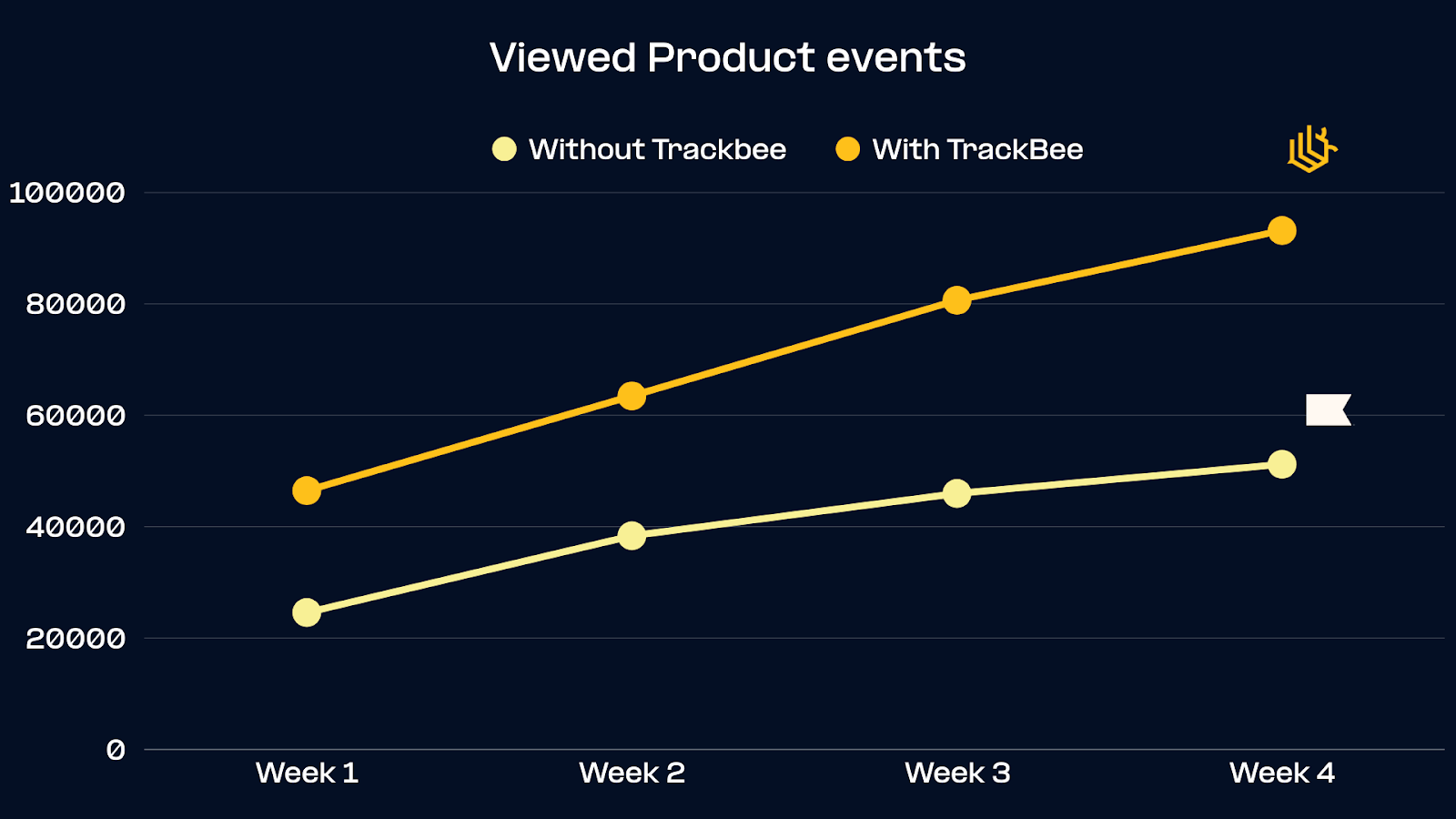
Sassy Saints discovered this gap when they implemented TrackBee: they were tracking 77% fewer product view events in Klaviyo than were actually occurring on their store. Their browse abandonment flow was triggering for less than a quarter of the users it should have reached.
How to Diagnose Your Browse Abandonment Tracking
Before fixing your flow, understand how large your tracking gap is. Here's a simple diagnostic:

Step 1:
In Klaviyo, go to Analytics > Events and look at "Viewed Product" event volume for the last 30 days.
Step 2:
In Google Analytics 4 or your Shopify analytics, look at product page views for the same period.
Step 3:
Compare the numbers. Klaviyo's Viewed Product events should be roughly proportional to your product page views (accounting for the fact that anonymous users without a Klaviyo profile won't generate trackable events, but identified users should). A significant gap - particularly if it exceeds 30–40% - indicates a tracking problem rather than a normal anonymous traffic ratio.
Step 4:
Check your flow analytics. Look at the number of emails sent over 30 days and compare it against your total Klaviyo profile count. If your browse abandonment flow is sending to a very small percentage of your list, it's likely a trigger problem rather than a flow performance problem.
The Tracking Fix: Server-Side Event Capture
Fixing browse abandonment tracking at the root requires server-side event capture combined with persistent customer identity.
Server-side Viewed Product events
- captured at the Shopify store's server level rather than in the visitor's browser - aren't subject to ad blockers, cookie restrictions, or browser limitations. Every product view is recorded, regardless of what the visitor's browser allows.
- the second half of the fix - ensure that when a server-side Viewed Product event fires, it can be connected to a Klaviyo profile even when the visitor's browser cookies are gone.
TrackBee builds shopper profiles that persist across sessions and devices. When a customer browses your store in Chrome today, TrackBee recognizes them even if their last visit was in Safari last week. If they're a known Klaviyo subscriber, the Viewed Product event is sent to Klaviyo with their identity attached - triggering the flow correctly.
The combined result: more Viewed Product events reaching Klaviyo, and more of those events connected to identifiable Klaviyo profiles. More triggers fire. More browse abandonment emails send. More revenue is recovered.
This is also why fixing your Klaviyo abandoned cart flow follows the same principle - server-side event capture solves the same underlying problem for both flows.
Best Practices for Your Browse Abandonment Flow Setup
Once your tracking is capturing events reliably, optimize the flow itself:
Trigger: "Viewed Product" Use the Viewed Product event as your trigger. Don't use a more complex custom event - keep the trigger simple and ensure it's the same event your tracking is sending reliably.
Filters to add:
-
Exclude customers who have placed an order in the last 30 days (avoid annoying recent purchasers)
-
Exclude customers who have started checkout (let your cart abandonment flow handle them)
-
Exclude customers who have received a browse abandonment email in the last 7 days (avoid over-emailing)
Timing:
-
First email: 30–60 minutes after the product view
-
Second email: 24–48 hours after the product view (if no purchase)
Email content:
-
Dynamic product block showing exactly which product they viewed
-
Clear product name, image, and price
-
Direct link back to the product page (minimize friction)
-
Subject line testing: urgency ("Still thinking about [product]?") versus curiosity ("You left something behind")
A/B test:
-
Subject lines (urgency vs. curiosity vs. social proof)
-
Timing of the first email (30 min vs. 60 min vs. 2 hours)
-
Number of emails in the sequence (2 vs. 3)
Real Results
Sassy Saints:
After implementing TrackBee's server-side tracking:
-
77% more product view events captured in Klaviyo
-
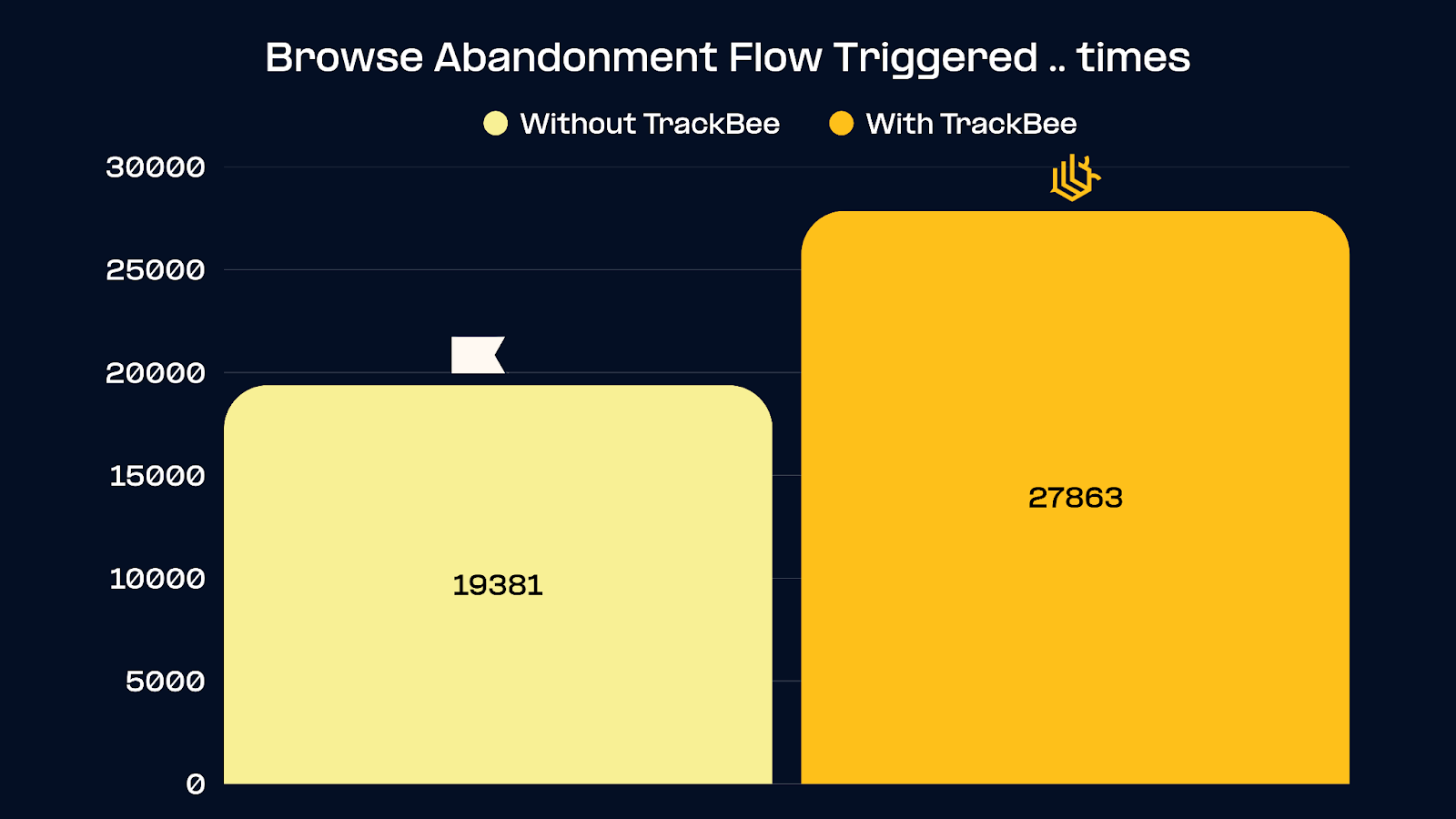
44% more browse abandonment flow triggers fired
-
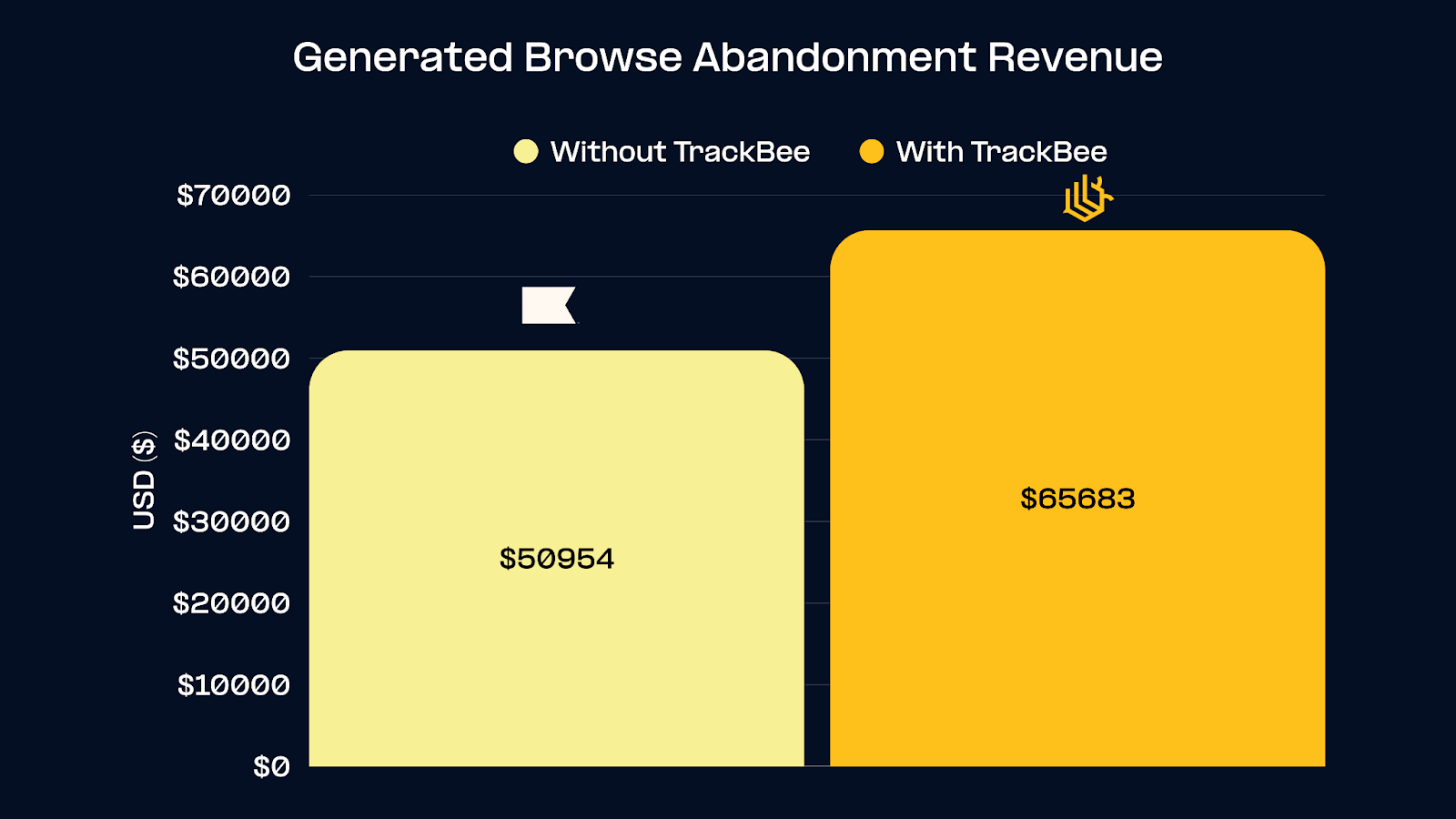
29% more revenue from browse abandonment flows
The flow itself didn't change. The tracking did. More events captured → more triggers fired → more revenue recovered.
For similar results in cart abandonment flows, see: How to improve your Klaviyo abandoned cart flow: fix missing events and recover revenue.
Frequently Asked Questions
My browse abandonment flow shows some revenue - does that mean my tracking is working? Partially. If your flow is generating some revenue, it's working for the users whose events are being captured and identified correctly. But "some revenue" doesn't mean "all the revenue available." The percentage of events you're missing determines the gap between your current performance and your potential.
Do I need to modify my Klaviyo flow setup when implementing TrackBee? No. TrackBee sends server-side Viewed Product events to Klaviyo in the standard format. Your existing flow triggers on those events exactly as before - just with more events arriving reliably.
Will this increase my Klaviyo email volume and costs? Yes - more triggers firing means more emails sending. But these are incremental emails reaching customers who would have received them under perfect tracking conditions. The additional email cost is far outweighed by the revenue recovered. Sassy Saints saw 29% more revenue from the same flow setup.
What's the difference between browse abandonment and cart abandonment tracking? Browse abandonment uses the "Viewed Product" event (customer viewed a product but didn't add to cart). Cart abandonment uses the "Started Checkout" or "Added to Cart" event. Both suffer from the same tracking problems, and both benefit from the same server-side fix.
Can TrackBee identify anonymous visitors for browse abandonment? TrackBee can only send browse abandonment events to Klaviyo for visitors who are known to Klaviyo (i.e., have a Klaviyo profile with an email address). For anonymous visitors, TrackBee enriches profiles over time - so a visitor who browses anonymously today and provides their email at checkout can be retroactively identified and enrolled in the right flows going forward.
Recover the Revenue Your Browse Abandonment Flow Is Missing
If your browse abandonment flow is working with incomplete event data, you're recovering a fraction of the revenue available to you. The fix isn't in your email copy or flow structure - it's in the tracking that feeds it.
TrackBee fixes this at the source: server-side Viewed Product events, persistent shopper profiles, and reliable Klaviyo integration.


.png)


